For a master with dealers
You decide what every dealer can do.
A Dealer you add starts by sending you its jobs; a Dealer Pro starts with its own tuning and the tools for it. The rest is yours to switch on for that dealer, one by one or for all at once, and what you switch off they cannot turn back on.
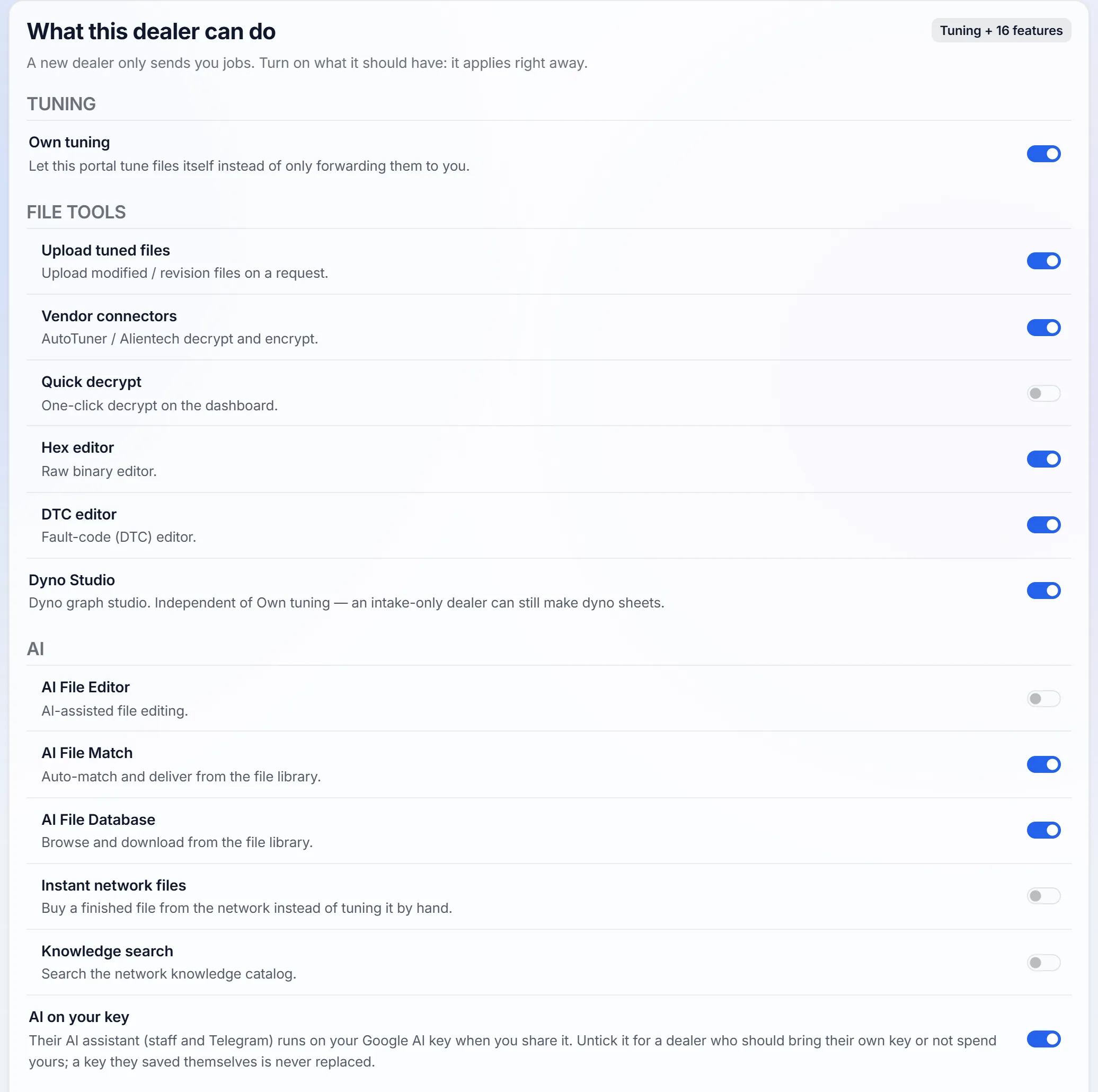
Own tuning, and what it opens
Off, every job a dealer takes comes to you. On, they tune files on their own portal and send you only the jobs they choose, and can take one back until you accept it.
Own tuning also opens their file tools and AI: uploading tuned files, decrypting, the editors, File Match and the file library. Switch it off and all of those go off with it.
- Who sets it: you and your admins, on the dealer's Features tab.
- When it applies: at once on their portal, or within minutes if it cannot be reached right then.
What their customers get
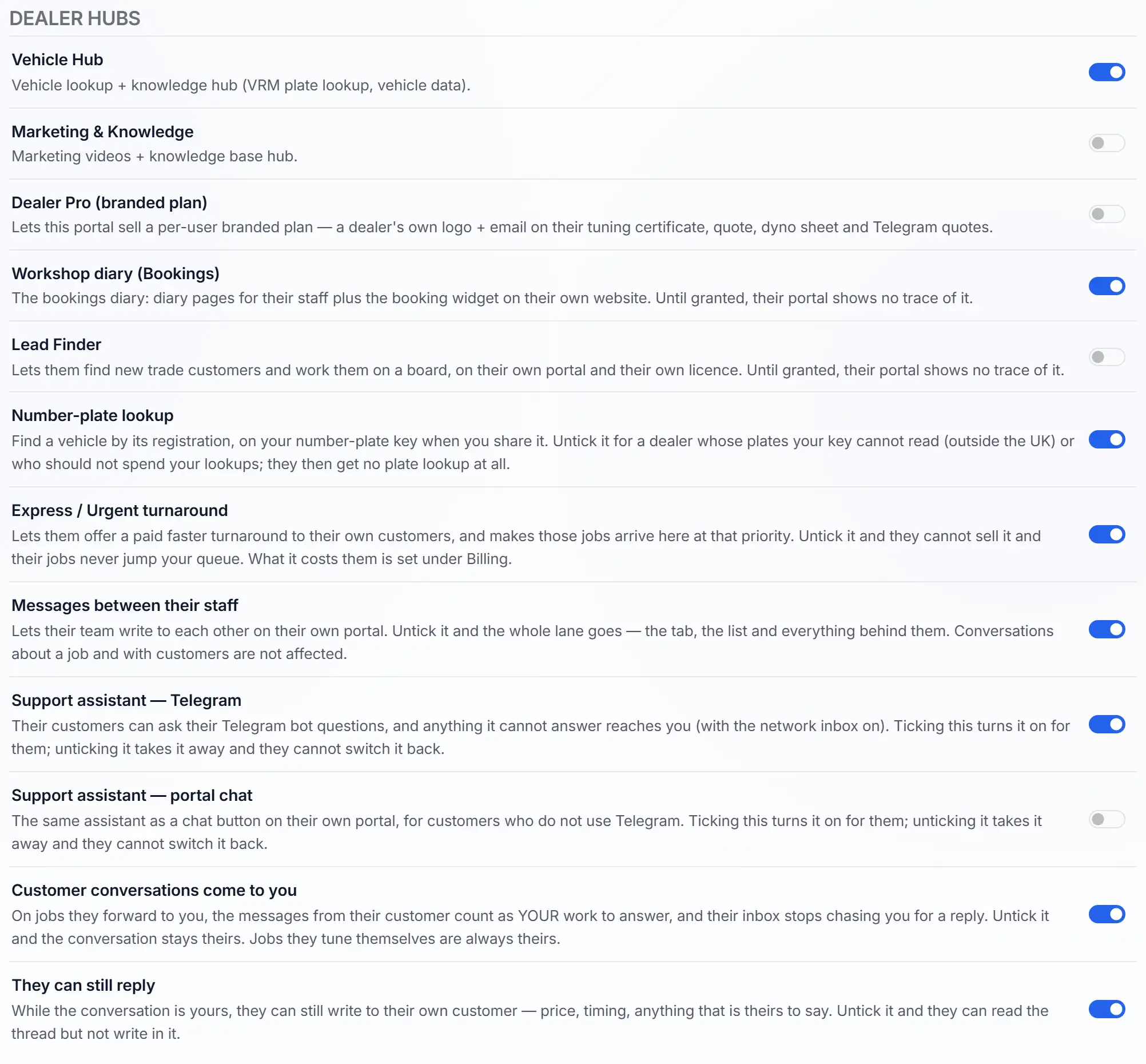
Some switches are for the people your dealer serves: the workshop diary and its booking form, the support assistant on Telegram and as a chat, number-plate lookup, an express turnaround they can sell, and who answers their customer on a job you tuned.
None of these needs Own tuning: a dealer who only sends you jobs can still offer them. Until you tick one, it is not on their portal.
- Who uses them: your dealer, and their customers.
One switch for every dealer
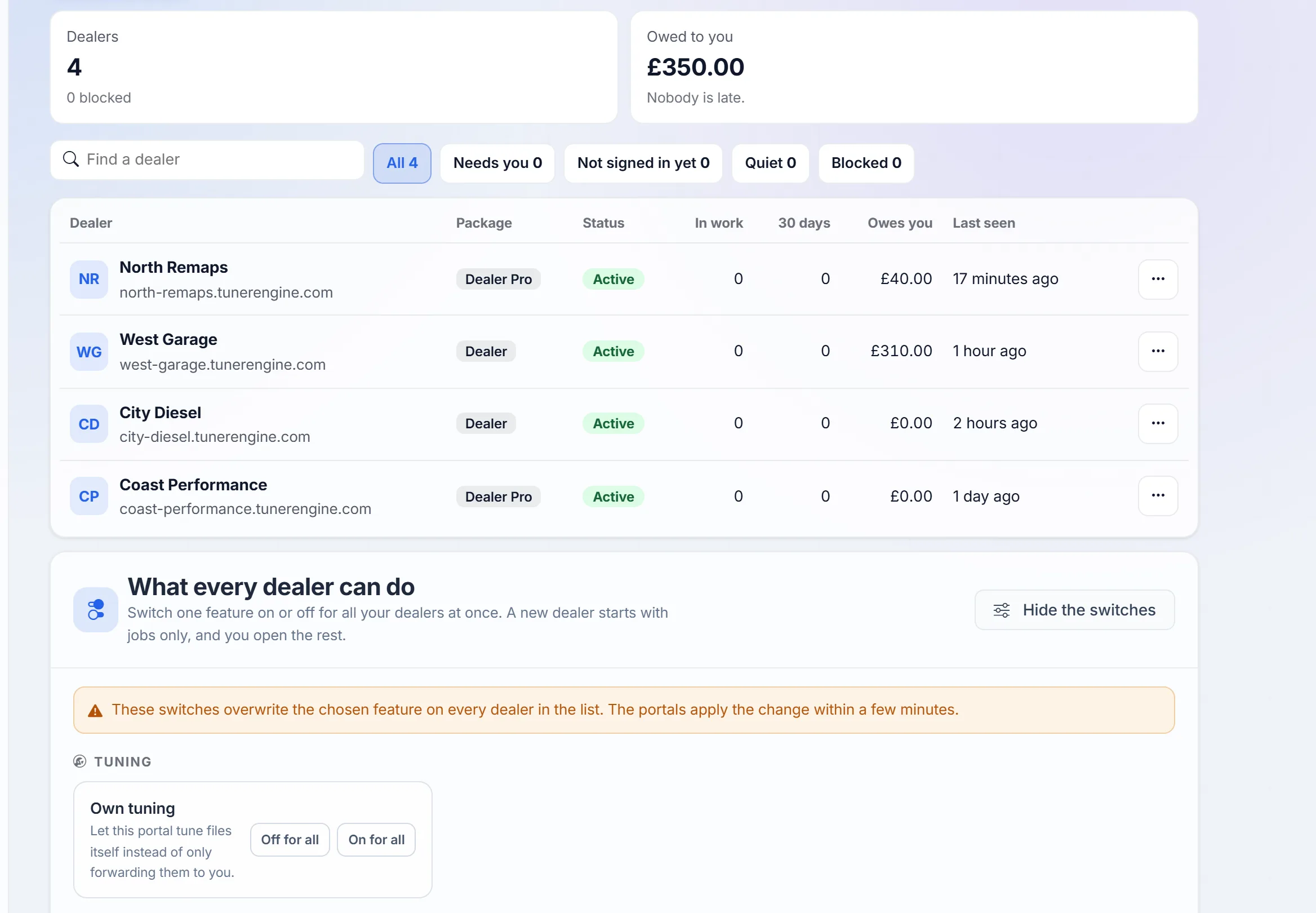
Under Your network, one switch turns a feature on or off for all your dealers at once. On a dealer's own page you set them one by one, so a dealer you trust can have more than a new one.
Every change is written down: who made it, and what it was before.
A price for each dealer
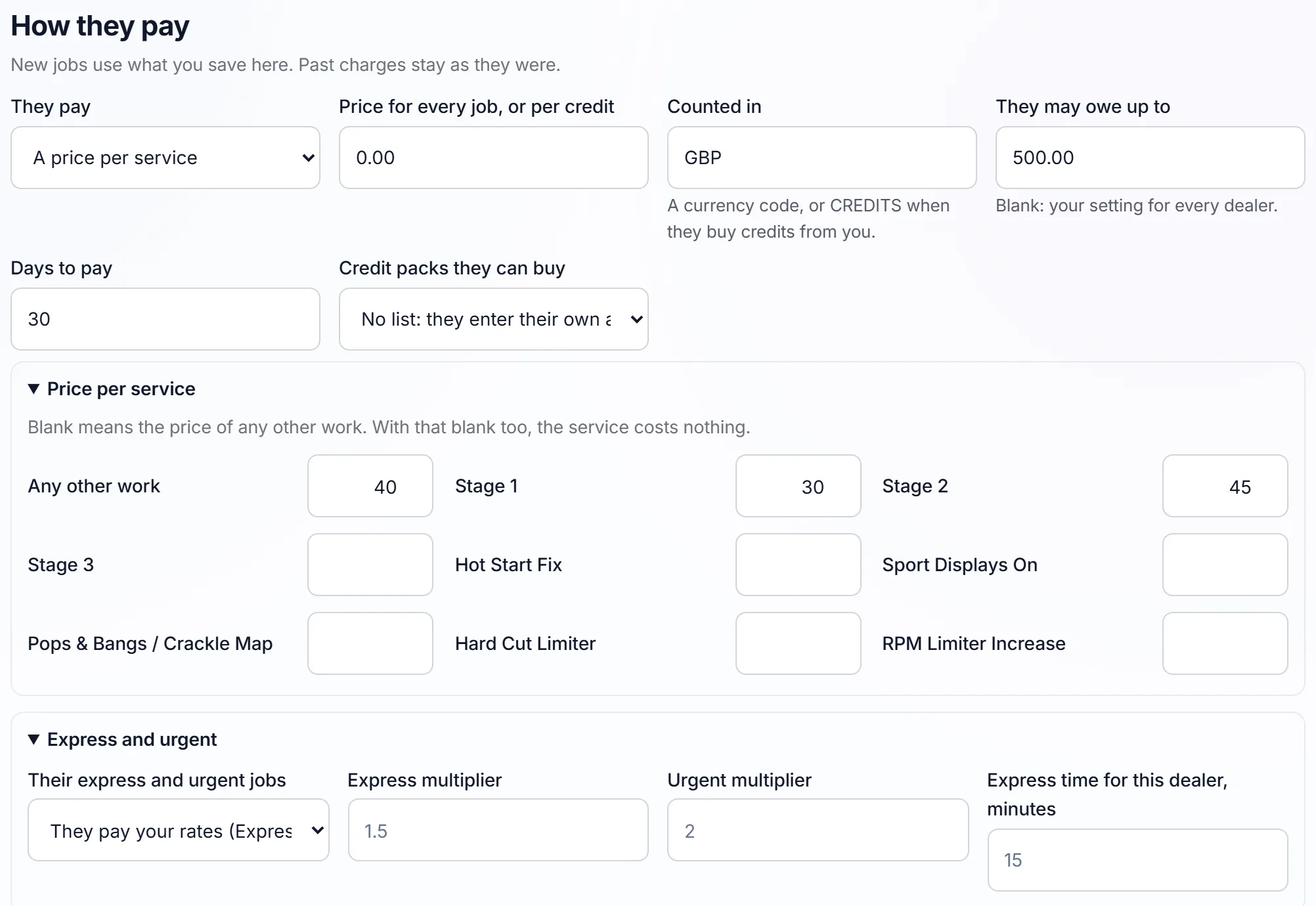
On each dealer's Account tab you choose how they pay you: one price for every job, a price for each service, a rate for each credit their job costs, your own price list, or settled outside the portal.
New jobs use what you save. Charges already made stay as they were.
- Who sees it: you and your admins only.
Stop their files, or close them
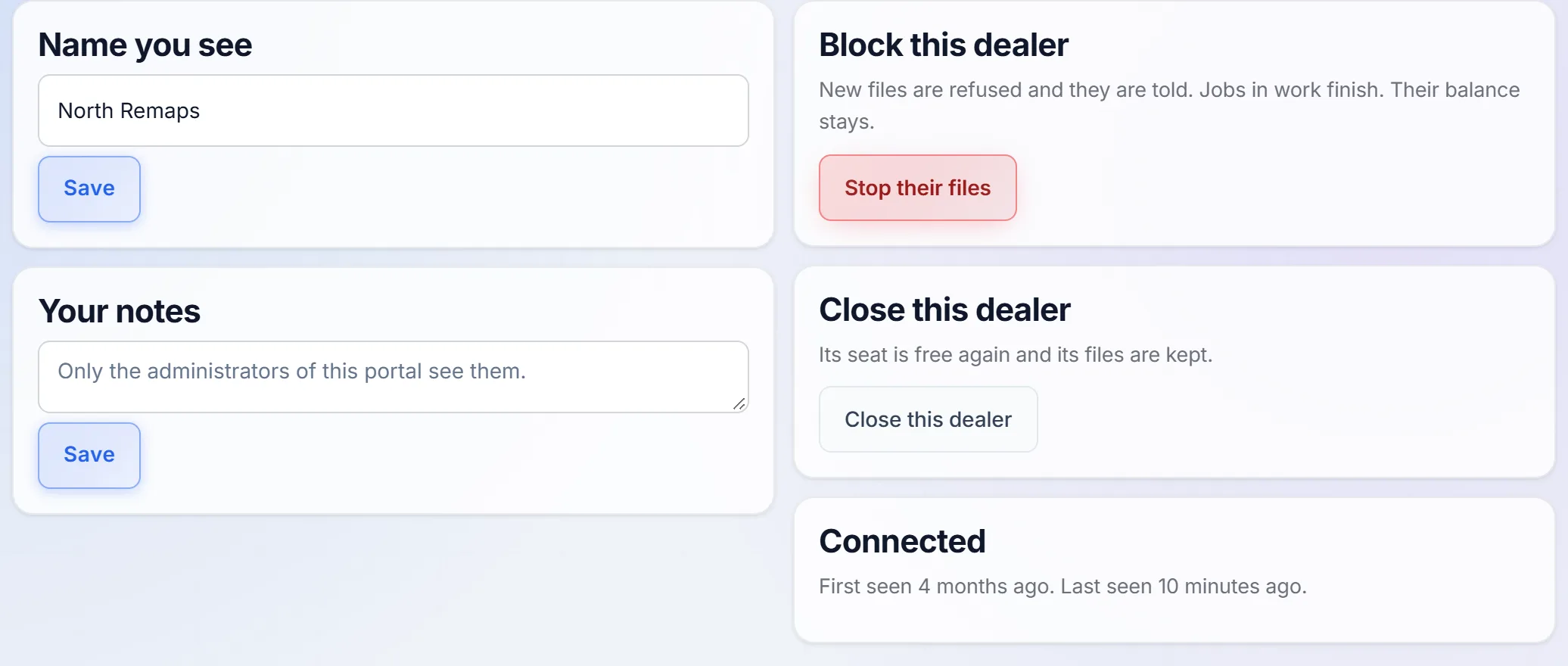
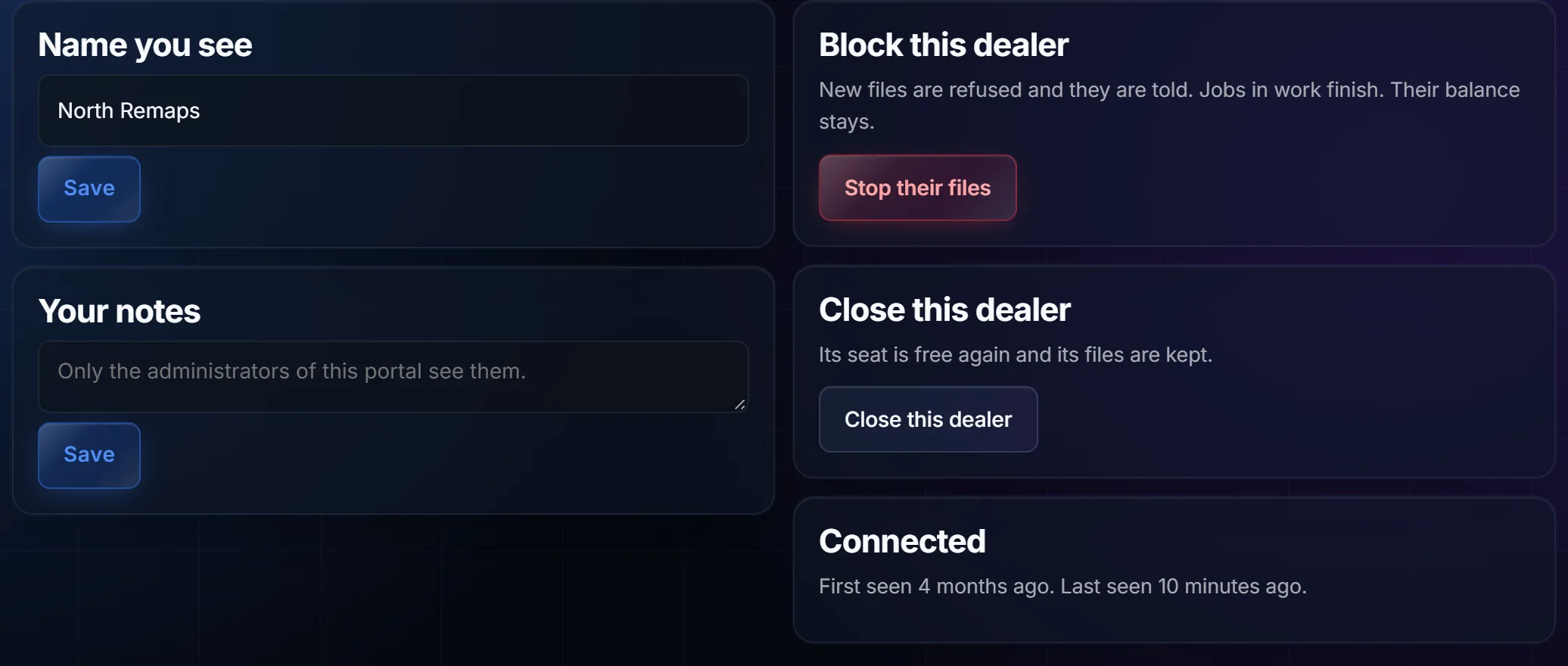
Block a dealer and new files from them are refused, and they are told. Jobs already in work finish, and their balance stays.
Close a dealer and their seat is free for the next one. Their files are kept.
- Who can: block: you and your admins. Close: you, the owner.
Every switch, by name
38 switches in 6 groups. These are the switches on a dealer's Features tab, in its groups and under its names. You set each one for each dealer; the i beside a name says how it works, where they see it, why, and who it is for.
Tuning
The one switch that decides whether a dealer tunes at all.
- Own tuning More about Own tuning How it works Off, every job their customers send comes to you. On, jobs stay on their portal: they tune them, send you any one by hand, and can take one back until you accept it. Switching it off also switches off everything marked "with Own tuning".Where they see it Their job queue and every job page.Why Give it to a dealer you trust with tuning; keep it off for a shop that only collects files.Who it is for The dealer's own tuners. On for a new Dealer Pro
- They tune files on their own portal instead of sending every job to you.
File tools
What they can do with a file on their own portal.
- Upload tuned files More about Upload tuned files How it works Opens the upload and the revision on a job. Off, they cannot deliver a file of their own; what you tune still reaches them.Where they see it On each job, where the tuned file goes.Why Every dealer who tunes needs it; a shop that only collects files does not.Who it is for The dealer's tuners. With Own tuningOn for a new Dealer Pro
- They put a tuned or revised file on a job themselves.
- Vendor connectors More about Vendor connectors How it works Opens their Integrations page, where they connect their own Alientech or AutoTuner master account; an encrypted read is then decrypted on their portal and the tuned file encrypted again.Where they see it Their Integrations page, and each job with an encrypted file.Why For a dealer who tunes and is a master on those tools.Who it is for The dealer's owner connects it; their tuners use it. With Own tuningOn for a new Dealer Pro
- Alientech and AutoTuner files decrypted and encrypted on their portal.
- Quick decrypt More about Quick decrypt How it works Opens the quick file tool: a file is decrypted without making a job for it.Where they see it The quick file tool on their dashboard.Why Saves a dealer who tunes a job for a quick look at a file.Who it is for The dealer's tuners. With Own tuningOn for a new Dealer Pro
- A decrypt in one press, from their dashboard.
- Hex editor More about Hex editor How it works Kept on the list for later: nothing on their portal follows this switch today, so it changes nothing.Where they see it Nowhere yet. The raw view of a file on a job does not depend on it.Why Leave it as it is until it is in use.Who it is for Nobody yet. With Own tuningNot in use yet
- The editor for the raw bytes of a file.
- DTC editor More about DTC editor How it works Opens the fault-code editor on a job: they search the codes in the file, edit them, save and export.Where they see it On each job.Why For a dealer who tunes and works on fault codes themselves.Who it is for The dealer's tuners. With Own tuning
- The editor for the fault codes in a file.
- Dyno Studio More about Dyno Studio How it works Opens Dyno Studio, where they make the dyno sheet for a job.Where they see it Dyno Studio in their menu, and the sheet on their customer's job.Why A sheet shows the customer what the work gave them.Who it is for The dealer, for their customers.
- Dyno sheets for their customers. It does not need Own tuning: a dealer who only sends you jobs can still make them.
AI
The file library, repeat files and help from AI.
- AI File Editor More about AI File Editor How it works Opens the AI file editor on their portal; it also needs their own setting for it on.Where they see it ECU Projects in their menu.Why For a dealer who tunes and edits files on their own portal.Who it is for The dealer's administrators. With Own tuning
- Help from AI while they edit a file.
- File Match More about File Match How it works Their portal compares each new read with their library; how far it goes, from showing a match to sending it by itself, is set in their File Match settings.Where they see it On each job, and in their File Match settings.Why A repeat file goes out without a tuner's time.Who it is for The dealer's tuners, and their customers. With Own tuning
- File Match on their portal: a file tuned before is found in the library and delivered again.
- AI File Database More about AI File Database How it works Opens the file library in their menu for their administrators and tuners.Where they see it The file library in their menu.Why For a dealer who tunes and needs finished files at hand.Who it is for The dealer's administrators and tuners. With Own tuning
- They browse the file library and download from it.
- Instant network files More about Instant network files How it works When a finished file for the same read is on the network, their job offers it and they buy it there. Off, the offer never shows.Where they see it On the job, as an offer, and Instant files in their settings.Why A dealer who tunes gets a common file at once.Who it is for The dealer's tuners. With Own tuning
- They buy a finished file from the network instead of tuning it by hand.
- Knowledge search More about Knowledge search How it works Opens Knowledge Search on their portal.Where they see it Knowledge Search in their menu.Why An answer on an ECU or a car without asking you.Who it is for The dealer's tuners. With Own tuning
- They search the network's knowledge catalogue.
- AI on your key More about AI on your key How it works When you share your Google AI key, their assistant for staff and on Telegram uses it. Off, they bring their own. A key they saved themselves is never replaced.Where they see it Behind their assistant: nothing changes on their screens.Why Untick it for a dealer who should bring their own key or not spend yours.Who it is for The dealer's staff, and their customers on Telegram. On for a new dealer
- Their AI assistant runs on your AI key when you share it.
Workspace
How their own team works on their portal.
- Community Hub More about Community Hub How it works Opens the Community Hub on their portal.Where they see it Community Hub in their menu.Why For a dealer who wants to follow what is coming and say what they need.Who it is for The dealer's administrators.
- The roadmap, the bug board and the community feed.
- Technician system More about Technician system How it works Opens the technician pages, once their own technician setting is on too.Where they see it The technician pages in their menu.Why For a dealer with several tuners paid by the job.Who it is for The dealer's owner and their tuners.
- Their tuners, what each one specialises in, commissions and payouts.
- Report-a-bug button More about Report-a-bug button How it works Shows the button to their administrators; a report goes with the page it was sent from.Where they see it The quick panel in their top bar.Why Keep it for a dealer who tells you what they find; untick it for a shorter top bar.Who it is for The dealer's administrators.
- The Report a bug button in their top bar.
- Performance / speed switcher More about Performance / speed switcher How it works Shows the speed choices in their quick panel, from every effect at full strength to the lightest.Where they see it The quick panel in their top bar.Why Useful on an older computer in a workshop.Who it is for The dealer's staff.
- The switch in their top bar that sets how many visual effects their screens run.
Dealer hubs
What their customers get, and who answers them.
- Vehicle Hub More about Vehicle Hub How it works Switches their Vehicle Hub on: vehicle lookup and vehicle knowledge, with what was looked up.Where they see it Vehicle Knowledge and Vehicle Hub activity in their menu.Why The car is known before the job is.Who it is for The dealer and their customers.
- Vehicle lookup and vehicle data, by number plate too.
- Marketing & Knowledge More about Marketing & Knowledge How it works Switches their Marketing & Knowledge hub on.Where they see it The marketing hub in their menu.Why Ready material for a dealer who sells to the public.Who it is for The dealer and their customers.
- Marketing videos and the knowledge base.
- Dealer Pro (branded plan) More about Dealer Pro (branded plan) How it works Switches the branded plan on for them, to sell to a customer of theirs, one customer at a time.Where they see it Their customers' accounts, and the papers those customers hand out.Why A dealer keeps the workshops that resell their files.Who it is for The dealer's trade customers. On for a new Dealer Pro
- They sell their own trade customers a branded plan: that customer's logo and email on the tuning certificate, the quote, the dyno sheet and Telegram quotes. Not the same as a Dealer Pro seat.
- Workshop diary (Bookings) More about Workshop diary (Bookings) How it works Switches their workshop diary on. Until you tick it, their portal shows no trace of it.Where they see it The diary in their menu, and the booking form on their website.Why For a dealer who also fits cars in a workshop.Who it is for The dealer's staff, and the customers who book.
- The bookings diary for their staff, and the booking form on their own website.
- Lead Finder More about Lead Finder How it works They buy it on their own licence, and your tick is the second lock. Until you tick it, their portal shows no trace of it.Where they see it Lead Finder on their portal, once bought.Why A dealer grows without you finding their customers.Who it is for The dealer's owner and whoever sells for them.
- They find new trade customers and work them on a board.
- Number-plate lookup More about Number-plate lookup How it works Runs on your number-plate key when you share it. Off: no plate lookup at all.Where they see it Wherever a car is looked up by its plate on their portal.Why Untick it for a dealer whose plates your key cannot read, or who should not spend your lookups.Who it is for The dealer's staff and customers. On for a new dealer
- They find a car by its registration.
- Express / Urgent turnaround More about Express / Urgent turnaround How it works Their customers can pick express or urgent, and those jobs arrive in your queue at that priority; what it costs the dealer is set on their Account tab. Off: they cannot sell it, and their jobs never jump your queue.Where they see it The order their customers fill in, and your queue.Why More money for both of you, where you can keep the promise.Who it is for The dealer's customers. On for a new dealer
- They sell a faster turnaround to their customers.
- Messages between their staff More about Messages between their staff How it works Off: that whole lane goes, the tab, the list and everything behind them. Messages on a job and with customers stay.Where they see it Messages, on their portal.Why Untick it for a one-person shop, or to keep the talk on the jobs.Who it is for The dealer's staff. On for a new dealer
- Their team writes to each other on their portal.
- Support assistant — Telegram More about Support assistant — Telegram How it works What it cannot answer reaches you, when the network inbox is on. Switching it on switches the portal chat on too. Off: they cannot switch it back.Where they see it Their Telegram bot.Why Customers get an answer at night, and you see what it could not answer.Who it is for The dealer's customers. On for a new dealer
- Their customers ask their Telegram bot questions.
- Support assistant — portal chat More about Support assistant — portal chat How it works Ticking it turns the chat on for them; unticking it takes it away, and they cannot switch it back.Where they see it A chat button on their portal.Why For their customers who do not use Telegram.Who it is for The dealer's customers.
- The same assistant as a chat button on their portal.
- Customer conversations come to you More about Customer conversations come to you How it works Their inbox stops showing them a reply owed on those jobs. Jobs they tune themselves always stay theirs.Where they see it The conversation on each job they send you, and their inbox.Why The tuner who did the work answers the question about it.Who it is for You, and the dealer's customers. On for a new dealer
- On the jobs they send you, their customer's messages are yours to answer.
- They can still reply More about They can still reply How it works Off: they read the conversation but cannot write in it.Where they see it The conversation on each job they send you.Why The price, the timing and anything of theirs stay theirs to say.Who it is for The dealer. On for a new dealer
- While a conversation is yours, they can still write to their own customer.
Dashboard widgets
Which boxes their dashboard shows. All on for a new dealer: you hide what they should not see.
- KPI cards More about KPI cards How it works Shows or hides those cards.Where they see it The top of their dashboard.Why The day at a glance.Who it is for The dealer's staff. On for a new dealer
- The figures at the top: jobs waiting, turnaround, active customers.
- Revenue & Operations More about Revenue & Operations How it works Shows or hides their revenue chart and today's figures.Where they see it Their dashboard.Why Hide it where their staff should not see the money.Who it is for The dealer's staff. On for a new dealer
- The money chart and today's snapshot.
- Market Intelligence More about Market Intelligence How it works Shows or hides those charts.Where they see it Their dashboard.Why Hide what a dealer's staff should not see, or does not need.Who it is for The dealer's staff. On for a new dealer
- The makes, the work and the ECUs they see most.
- Operations Deep Dive More about Operations Deep Dive How it works Shows or hides those charts.Where they see it Their dashboard.Why Hide what a dealer's staff should not see, or does not need.Who it is for The dealer's staff. On for a new dealer
- Jobs by status, fuel and file type, tool and method.
- Client Intelligence More about Client Intelligence How it works Shows or hides those charts; their administrators see them, never their tuners.Where they see it Their dashboard.Why Hide what a dealer's staff should not see, or does not need.Who it is for The dealer's administrators. On for a new dealer
- Customer growth, who comes back, and revenue by service.
- Staff & Performance More about Staff & Performance How it works Shows or hides that chart and the list of what is waiting.Where they see it Their dashboard.Why Hide what a dealer's staff should not see, or does not need.Who it is for The dealer's staff. On for a new dealer
- How their staff are doing, and what is waiting on them.
- Visitor Analytics More about Visitor Analytics How it works Shows or hides those charts.Where they see it Their dashboard.Why Hide what a dealer's staff should not see, or does not need.Who it is for The dealer's staff. On for a new dealer
- Visits to their portal: from where, on what device, at what hour.
- Business Tips More about Business Tips How it works Shows or hides those cards.Where they see it Their dashboard.Why Hide what a dealer's staff should not see, or does not need.Who it is for The dealer's staff. On for a new dealer
- Suggestions drawn from their own figures.
- Game leaderboard More about Game leaderboard How it works Kept on the list for later: their dashboard has no such board today, so it changes nothing.Where they see it Nowhere yet.Why Leave it as it is until it is in use.Who it is for Nobody yet. On for a new dealerNot in use yet
- The top players board on their dashboard banner.
What each dealer pays you
Set on the dealer's Account tab, for that dealer alone. New jobs use what you save; past charges stay as they were.
- The same price for every job
- One price for a job, whatever the work.
- A price per service
- A price for Stage 1, another for Stage 2, and one for any other work. A service left blank costs the price of any other work.
- A rate per credit they report
- Your rate times the credits the job costs on their portal.
- Your own price list
- Each job charged at your own prices for the work on it, whatever their portal shows.
- Settled outside the portal
- You settle the money between you, elsewhere. Their balance never holds a file.
- Counted in
- Money, in the currency you choose, or credits they buy from you.
- Express and urgent
- They keep what their customer paid extra, or pay your express and urgent rates, or a rate you set just for them; and you can promise that dealer an express time of its own. A rate per credit adds nothing.
Credits, limits and late payment
Each dealer has a balance with you: what they paid in, less what their jobs cost. Every movement is a line on their statement, for any period, and the statement exports.
- When a dealer may send with no money
- One rule for all your dealers, in your settings: always, not once their balance is at zero, or up to a credit limit.
- They may owe up to
- That dealer's own limit, when the rule is up to a credit limit; blank, your limit for every dealer. A job past it is not taken: it waits on their portal and comes through by itself once they top up or you raise the limit, and you are told.
- Days to pay
- Owing inside these days is normal. Past them, or past their limit, the dealer shows as Late payment at the top of your list.
- Credit packs they can buy
- The packs they top up with, from your price lists. With no list, they enter their own amount.
- Money received
- A bank transfer, cash or a card payment you record goes on their balance as a line. Free credits, a correction or money taken off are lines too, never a quiet change.
- Blocked
- New files from them are refused and they are told; jobs in work finish and their balance stays. A file they try to send waits on their portal and comes through by itself if you unblock them, and you are told it was tried.
Their add-ons, on your bill
You pay for a dealer's add-ons at the list price, on your own bill. In My account you add a dealer with its add-ons and pay for both at once; an add-on switched on later is paid then, and one switched off stays to the end of what was paid and leaves your bill from the next 1st. On a yearly plan, an add-on pays the rest of your year, then renews with it.
- AI package
- €24 a month for each dealer that has it.
- File Match
- €35 a month for each dealer that has it.
- Priority support
- €35 a month for each dealer that has it.
- Extra staff
- €5.90 a month for each extra person.
- Extra storage
- €2.30 a month for each extra 100 GB.
- White label
- €12 a month for each dealer; the first 5 are included while you have white label yourself.
Seats
Every dealer takes a seat. A Dealer sends you its jobs; a Dealer Pro tunes its own and sends you what it chooses. In your list, a dealer with Own tuning on shows as Dealer Pro.
- On Network
- Each dealer €35 a month, a Dealer Pro €70, on your bill from the 1st.
- On Master
- 5 dealer portals included, Dealer Pro portals filling them first; past them, each is €30 a month, a Dealer Pro €60.
- Adding a dealer
- Their address, business, owner and Dealer or Dealer Pro. Their portal is ready in under a minute, and they get an email to set a password.
- A free seat
- Your list shows the seats you use and the seats still free. A dealer on a free seat costs nothing more.
- Closing a dealer
- Only you, the owner, close a dealer. Its seat is free again, and its files are kept.
Who sees what
Each portal has a database of its own: what one dealer holds, no other dealer can read.
- Their customers
- Only their dealer's portal, in their dealer's name. A job you tune goes back to them through it.
- The dealer
- Their own customers and jobs, their balance with you, and what you switched on for them.
- You and your admins
- Every job a dealer sends you, with the dealer's name; the customers on those jobs; each dealer's balance, statement and switches. Jobs a dealer tunes itself stay on its portal.
- Your tuners
- The jobs your dealers send, in your queue. The dealer pages and the money are not theirs to open.
- Another dealer
- Nothing: not your other dealers' customers, jobs or prices.
Who sees it, and how it is switched on
Who sees it
- Your customers
- Your dealers' customers see only their dealer's portal, in their dealer's name.
- Your team
- You and your admins set the switches, the prices and the blocks; your tuners work the jobs.
- Switched on
- With Network or Master. A new Dealer starts with jobs only, a new Dealer Pro with its own tuning; you open the rest.
Questions
Asked before you start.
Something else? Write to [email protected] and a person who tunes files answers.
What is a dealer portal?
A portal in your dealer's name, with their own customers. The files come to you, and you decide what each dealer can see, sell and do.
What does a dealer portal cost?
Each dealer portal is €35 a month, or €70 for Dealer Pro, on the Network plan's bill.
Can my dealers and I talk on a job?
Yes. A dealer's customer writes on a job and you read it; your answer, and the reason when you turn a file down, go back to the dealer.
Name your portal. It is ready in under a minute.
Pro: today you pay this month in full, or only the days left if the 1st is less than 10 days away; then €60 on every 1st.
- Your name and logo
- Files from any tool
- Updates done for you
- Moving in free on paid plans
You can change your portal's address from your account at any time, or add another to the same portal, free. More are coming: tunerengine.co.uk, tunerengine.uk and tunerengine.info, then new short ones made for portals.