A function of your portal, in full
The result your customer paid for, on a sheet with your name.
Dyno Studio turns a run into a dyno sheet: the car, its power and torque before and after the tune, the graph, and your logo and contact details. The customer finds it on the same page as their file, downloads it as a PDF and shows it to everyone who asks what the tune did.
A tune cannot be seen. The customer drives away with a car that pulls harder and nothing to show for it but a feeling. A dyno sheet is the proof they keep, and the one piece of your work that gets passed to friends, posted in owners' groups and handed over when the car is sold. The portal makes that sheet in your brand, not in the dyno maker's.
There are two places to make one. On a job, the request page has a dyno sheet section: the car and the ordered stage are already known, so the peak figures and a curve are filled in from your vehicle data, and the tuner corrects them to what the dyno measured. In Dyno Studio, a row in the menu, your team makes a sheet for any car without a job behind it, and finds every sheet the shop has made by title, car or engine code.
A sheet starts as a draft that only your team sees. Publishing shows it to the customer on their request, sends them an email and a notice, and gives them the PDF. A published sheet can be hidden again, replaced by a corrected version, or locked so its figures can never change by mistake.
The settings section, Dyno sheets and certificates, decides how every sheet looks and reads: simple one-page sheet or detailed report, units, correction standard, colours, paper, the name and contacts printed on it, the disclaimers, the watermark. The same section holds the tuning certificate, the second document a customer downloads with their file.
A shop's day without it
The run is done and the numbers are good. The tuner photographs the dyno computer's screen, or exports a sheet with the dyno maker's logo across the top, and sends it on WhatsApp. It has no shop name on it, no phone number, and by next month nobody can find it. The customer who posts it online is advertising the dyno brand. A shop without a dyno has nothing to send at all, only a line in a message saying roughly what the car should now make.
From the rollers to the customer
A run becomes a sheet in four steps and one press
The sheet editor walks your tuner through the run in the order it happened. Most fields arrive filled in.
- The runWho ran it, on which dyno, in which gear, how many pulls were averaged, and whether the engine is turbocharged. The operator and the dyno model are already there.
- The air that dayTemperature, humidity, pressure and altitude, and the correction standard the figures are brought to.
- The figuresPeak power and torque, stock and tuned, each with its revs. The curve is drawn from the peaks; paste the dyno's own export to replace it.
- The previewThe graph as the customer will see it, the notes for them, and notes only your team reads. A gain that looks too good is questioned here.
- PublishThe customer gets an email and a notice, and the sheet appears on their request with its PDF.
After publishing: Lock freezes the figures, Create new version starts a corrected draft and keeps the old one in the history, Revoke hides the sheet from the customer.
On the customer's phone
The moment they open it
Most customers first see their sheet on a phone, minutes after you publish it. This is what reaches them.
- GGolf GTI, Stage 1245 to 310 hp, 370 to 450 Nmnow
- TTransporter 2.0 TDI150 to 190 hp, 340 to 420 NmMarch
- OOctavia vRS184 to 220 hp, 380 to 440 Nmlast year
- Told at oncePublishing sends the customer an email and a notice in the portal. The email carries a download link for the PDF that works for a day, even when they are signed out.
- On the job, beside the fileThe sheet sits on the request it belongs to: stock and tuned peak power and torque, the graph and the PDF.
- Every car they brought youDyno Studio shows a customer their own sheets in one list, so the van from March is as easy to find as today's car.
- Stars, if you askWith the rating switched on, the sheet shows a row of stars until the customer has rated the tune.
- Your name on what they shareThe PDF carries your logo, business name, phone, email and website. Whoever sees it next knows where it was done.
Where the sheet and the certificate sit on a job
The delivery side of a request, as your team sees it: the file, the stock and tuned figures, and the certificate the customer downloads with the file.
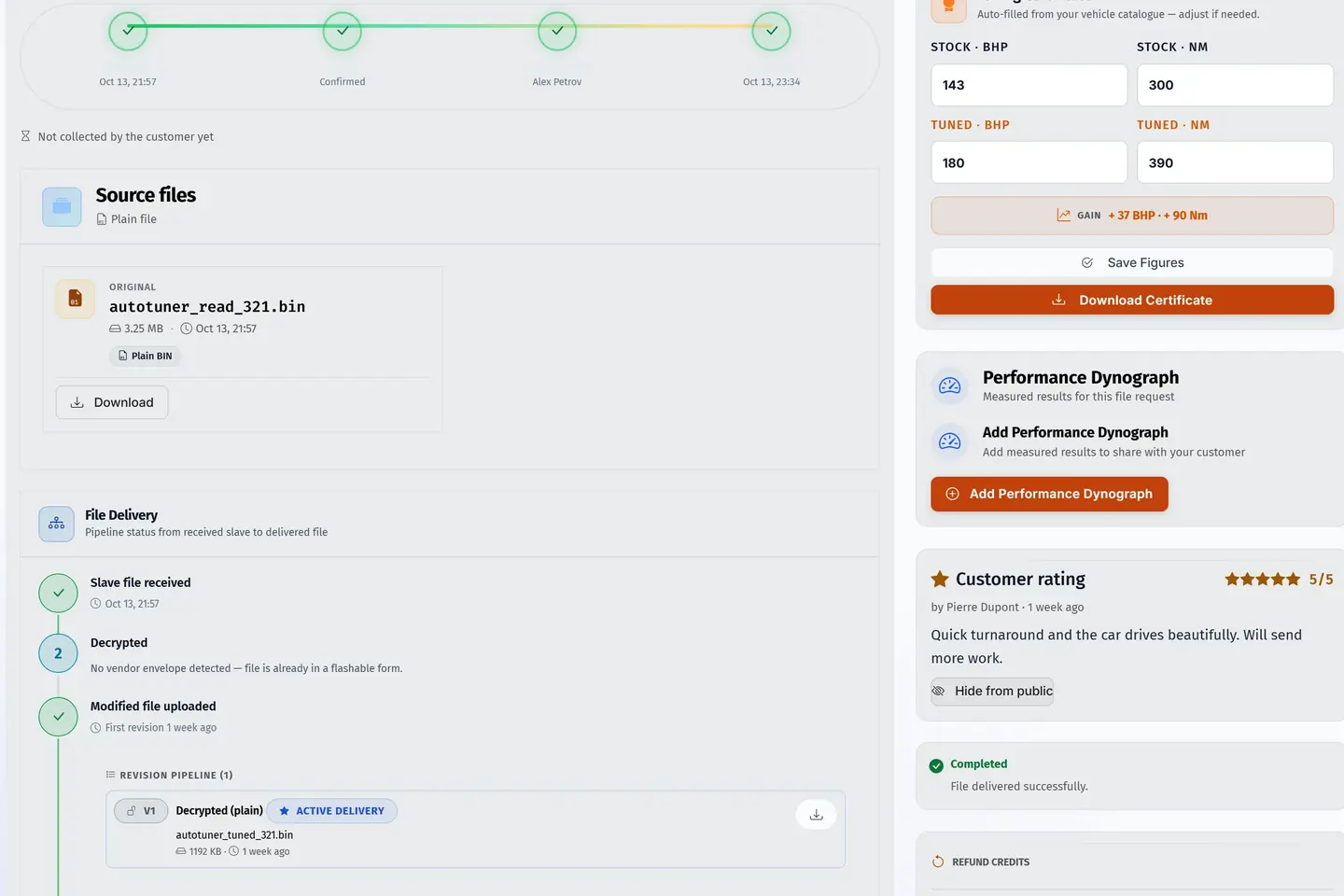
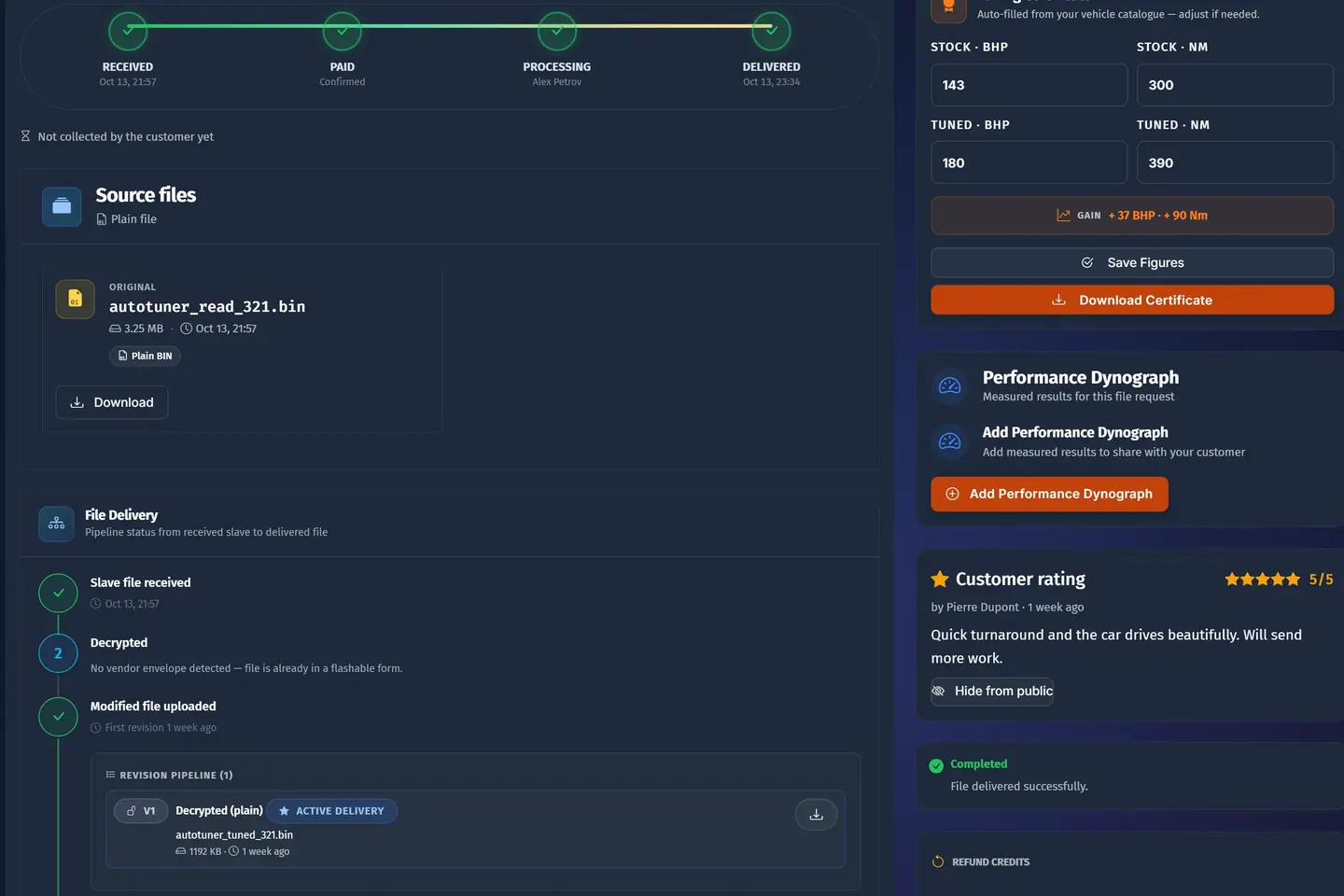
- 1The read, as it came inThe original file kept with the job; an encrypted file is decrypted if you are its master.
- 2Every step of the fileReceived, decrypted when needed, tuned, delivered, each with its time.
- 3Stock against tunedPower and torque before and after, filled in from your figures.
- 4A certificate in your brandThe customer downloads it with the file, your name on top.
A sample shop; your portal carries your name.
The page itself
What is printed on a sheet, from top to bottom
Each line of the PDF comes from a setting you make once. Read down the page and you have read the settings.
- Your logo and nameThe dyno sheet logo, or your portal logo; the business name, VAT number, phone, email and website.
- The car and the peaksStock and tuned power and torque in your units, with the gain in your gain colour.
- The graphStock and tuned curves across the revs, upright or sideways, on A4 or US Letter.
- The conditionsOn the detailed report: the dyno, the gear, the runs averaged, the operator, the air and the correction standard.
- The notesYour words for the customer, then the disclaimer, and on the simple sheet the second line that says what the graph is.
- The watermarkOn a published detailed report, your name in faint capitals across the page.
What you find on it
Dyno Studio
Dyno Studio in the menu. For your team it is the library of every dyno sheet the shop has made and the place to start a new one for any car, with or without a job. For a customer the same row opens the list of their own published sheets. It comes with Pro and above, and a master can switch it on or off for each dealer.
- The header
- How many sheets there are and in which state: drafts, published, revoked, and how many were made in the studio without a job. Beside it, the recent activity and three short tips.
- New dynograph
- Starts a sheet with no job behind it. Pick the engine from the vehicle picker and the peaks and a curve are filled in from your vehicle data, or enter everything by hand. The sheet opens in the same editor a job uses.
- Find a sheet
- Search by title, car or engine code. The list can be sorted and exported.
- Three ways to look
- A table with every column, cards with the figures large, or a compact list for a long history. The portal remembers nothing you need to set up: pick the one that suits the screen you are on.
- Each sheet
- A row shows the car, where the sheet came from (the studio, or the number of its request), the gain, whether a curve is set, the status, who made it and when it last changed. Open it to edit a draft, publish, lock, revoke or start a new version.
- Your dyno sheets
- What a customer sees on this page: their own published sheets, each with power and torque before and after, ready to open and download. Drafts and other customers' sheets are never there.
- Help and glossary
- Short answers on the page for the tuner filling a sheet in: what a correction factor is, what the stages mean, what counts as a turbo engine for the gain warning, the layout the curve import accepts, and what Publish and Lock do.
Dyno sheets and certificates settings
Settings → Requests and files → Dyno sheets and certificates. The section switches dyno sheets on, picks the style of the PDF and everything printed on it, sets the units and standard a new sheet starts with, and draws the line above which a gain is questioned. Its last three settings are the tuning certificate: whether one is made for each delivered file, for which work, and in which look.
How it works
- Set the section up once: your dyno model, units and correction standard, the name and contacts for the sheet, a logo that prints well on white, and the style of PDF.
- A job is tuned and delivered. On its request page the tuner opens the dyno sheet section, or presses Quick Generate PDF to make and deliver a sheet from the vehicle figures in one go.
- In the editor the run details are filled in, then the conditions, then the peaks. The curve is drawn from the peaks; where the dyno gave a full trace, it is pasted in as columns of revs, stock and tuned power, and optionally torque.
- The preview shows the sheet. If the gain is above your warning line, or the tuned curve dips under stock, the tuner is told and decides. A curve with fewer than five points, or revs that do not rise, is refused.
- Publish. The customer gets an email with a PDF link and a notice in the portal, and the sheet appears on their request with the figures and the graph.
- The customer opens it, downloads the PDF, and rates the tune on the sheet if you ask for a rating. With certificates on, the tuning certificate is beside the file as well.
- When the final figures are in, Lock the sheet. If a figure was wrong, Create new version, correct it and publish that; the old version stays in the history. Revoke hides a sheet and tells the customer the results were updated.
- For a car with no job, a show car, a customer of the workshop, a before-and-after for your own website, start from New dynograph in Dyno Studio.
Who it is for
- The ownerSets the look once, so every sheet and certificate that leaves the shop carries the business name, the right contacts and the right disclaimer. Sees every sheet the team made.
- Your tunersMakes the sheet on the job with most of it filled in, corrects the figures to what was measured, publishes, and locks it when it is final. Is warned before publishing a figure that looks like a typing mistake.
- Your teamFinds any sheet again by car or engine code when a customer calls months later, and makes a studio sheet for a walk-in car that never had a file request.
- Your customersSees the result they paid for on the same page as their file, keeps the PDF, finds all their sheets in one list, and has a certificate for the tune.
- A masterPublishes a sheet on a dealer's job and it is delivered to the dealer's portal, where the dealer's customer sees it. Decides dealer by dealer whether they get Dyno Studio.
- Your dealersHands their own customer a sheet for a file the master tuned, on the dealer's portal and under the dealer's name.
Every setting, explained
Dyno sheets and certificates settings
31 settingsSettings → Requests and files → Dyno sheets and certificates. The section switches dyno sheets on, picks the style of the PDF and everything printed on it, sets the units and standard a new sheet starts with, and draws the line above which a gain is questioned. Its last three settings are the tuning certificate: whether one is made for each delivered file, for which work, and in which look.
Loss colour
One of the colour family: marks a loss, where the tuned curve drops under the stock one. A tune does not add everywhere, and an honest sheet shows it.
Gain colour
One of the colour family: marks a gain, where tuned is above stock.
Stock curve colour
The first of four colours. This one draws the stock curve, the car before the tune, on the detailed report and its chart. The simple sheet does not read it: that one keeps its own fixed colours for power and torque.
Tuned curve colour
One of the colour family above: the tuned curve on the detailed report, the result the eye should land on first.
Power correction standard
A dyno reading depends on the air that day; a correction standard brings it to a reference so runs can be compared. This is the standard a new sheet starts with, and the tuner can change it for one run. The detailed report prints it, with the correction factor when there is one.
- SAE J1349 The usual standard in the United States.
- DIN 70020 The usual standard in much of Europe.
- EEC 80/1269 The European directive standard some dyno software offers.
- ISO 1585 The international standard.
- No correction The figures as measured; nothing is printed about a standard.
Your dyno model
The make and model of your dyno, filled into the first step of every new sheet beside the name of the person signed in. Either can be changed for a run done elsewhere. The detailed report prints it with the conditions.
Power unit
The power unit a new sheet starts with. The tuner can change it on one sheet. Torque has its own setting.
- Horsepower (HP) What most customers quote.
- Kilowatts (kW) For markets where the registration papers and the customers use them.
Torque unit
The torque unit a new sheet starts with, set apart from power so horsepower with newton metres is possible. The tuner can change it on one sheet.
- Newton metres (Nm) Used almost everywhere.
- Pound-feet (lb-ft) For customers who grew up with them.
Dyno sheets
The one switch for the whole function. On, your team has the Dyno Studio row and every request page has a dyno sheet section, where the sheet is made and where the customer reads it once it is published. Off, both are hidden; nothing already made is deleted. It comes with Pro and above.
Gain warning, turbo
For a car marked as turbo on its sheet: the power gain, as a percentage of the stock figure, above which the tuner is shown a warning naming the gain and this line before publishing. It is a warning to read, and the tuner can publish after it.
Gain warning, non-turbo
The same warning for cars not marked as turbo, where a tune gains far less. Works as the turbo line does.
Dyno sheet logo
A logo for the sheets alone, printed on both styles. Without an upload your portal logo is printed. Press Remove and no logo is printed at all; a fresh upload brings one back.
Dyno sheet orientation
Turns the page for both styles, together with the paper size.
- Upright (portrait) Like the rest of the customer's paperwork.
- Sideways (landscape) The graph runs the long way and gets the room.
Dyno sheet paper size
The paper every sheet is made for, simple or detailed. It is read when the PDF is made, so a sheet downloaded after a change comes out on the new size.
- A4 For Europe and most of the world.
- US Letter For the United States and Canada.
Dyno sheet style
Which of two PDFs every sheet on your portal is. Both print your logo, name and contacts.
- Simple sheet One page: the graph of stock and tuned power and torque, the difference, and two short notes under it. Its graph keeps a fixed pair of colours.
- Detailed report The peak comparison with gains, the measuring conditions, the gear, the runs averaged, the operator, a sheet reference and your notes, drawn in the curve colours you set.
Rating before dyno sheet
Shows the customer a row of stars on their published sheet until they have rated it. One rating per sheet; once given, the stars stay and are not asked for again. Who rated and when is kept beside the sheet for your team. The figures and the download stay in view either way.
Email on dyno sheets
The address in the contact line of every sheet. Left empty, the address your portal sends its emails from is printed. It must be shaped like an email address to save.
Phone on dyno sheets
The number in the contact line, printed as you type it, with the country code and spacing you want. Left empty, nothing is printed in its place.
Website on dyno sheets
The web address in the contact line. Left empty, your portal's own address is printed. It must be shaped like a web address to save.
Name on dyno sheets
The business name printed on every sheet. Left empty, the portal's name is printed. It also becomes the watermark when the watermark text is empty.
VAT number on dyno sheets
Your tax number in the business details of every sheet, printed as typed, with the country prefix if it has one. Left empty, nothing is printed.
Second disclaimer text
Your own words for that second note. Left empty, the standard note is printed. It is printed only while the second line is switched on, and the field is short on purpose: a sentence or two.
Second disclaimer line
Prints a second note under the graph of the simple sheet, marked with a double star, saying the graph is drawn to show the difference between stock and tuned. Off, only your disclaimer is printed.
Watermark on dyno sheets
Lays one large, faint, tilted line of text across the page of the detailed report, once it is published; a draft stays clean. The simple sheet has no watermark and carries its notes under the graph.
Watermark text
The words of the watermark, printed in capitals whatever you type. Left empty, the name on your dyno sheets is used, or the portal's name when that is empty too. It counts only while the watermark is on.
Tuning certificates
Makes a certificate for each delivered file: the car, the services done and, where the work changed power, the figures, under your portal's name and logo. The customer downloads it from their request page, next to the file. Staff can set the stock and tuned figures on the request before completing it, so the certificate prints what was measured. Off, none is made and no button shows. It comes with Solo and above.
Certificates only for power tunes
Makes a certificate only when the order holds a service marked as a stage in your services list, or when staff typed stock and tuned figures on the request by hand. An order with neither gets no certificate and no button. Off, every delivered file gets one, without power figures where the work did not change power.
Certificate look
Draws the tuning certificate dark or light. The vehicle certificate and the quote PDF from the vehicle pages follow the same choice, so your documents match. It is read when the PDF is made.
- Dark Striking on a phone; heavy on a printer.
- Light Prints anywhere.
How shops use it
A workshop with its own rolling road
A shop that tunes on site and runs every car before and after
The tuner finishes the after run and opens the job on the workshop computer. The stage and the car are already on the sheet. He pastes the dyno's export into the curve, checks the peaks, adds two lines for the customer about the mid-range, and publishes while the car is still strapped down. The customer's phone buzzes in the waiting room.
The customer leaves with the sheet already on their phone, the shop's name on it, and the stars filled in before they reach the car park.
A file service that never sees the car
A remote tuner serving customers and workshops by file
There are no rollers. After delivering, the tuner presses Quick Generate PDF and the portal makes a sheet from the vehicle figures for the ordered stage. The second disclaimer line stays on, so the page says plainly that the graph is drawn to show the expected difference. Where a workshop sends back a real run, the tuner creates a new version with the measured figures.
Every delivered file comes with something to show, and nothing on the page claims a measurement that was not made.
A master whose dealers hand out sheets
A master tuning for a dozen dealers
A dealer sends a job up. The master tunes it, makes the sheet on the job and publishes. The sheet is delivered to the dealer's portal, where the dealer's customer finds it on their own request. For the dealers who run their own dyno days, the master switches Dyno Studio on, so they make studio sheets themselves.
The driver gets a sheet from the business they bought from, and the dealer has one more reason to stay.
A dyno day for a car club
A shop running thirty club cars in an afternoon
None of the cars has a file request. Staff start each one from New dynograph, pick the engine, type the measured peaks and publish nothing: the sheets stay drafts until the evening. Then the owner goes through the list in card view, corrects one typing slip the gain warning flagged, and downloads the PDFs to send out.
Thirty owners each hold a sheet with the shop's phone number, and the shop can find every one of those cars again by engine code.
Where it helps, and its limits
Where it helps most
- A shop with a dyno that wants its own name, not the dyno maker's, on what customers share.
- A file service that wants to hand over something visible with each tune, and say honestly what the graph is.
- A master who wants dealers' customers to receive a sheet under the dealer's name.
- A shop that sells on results and needs to find last year's sheet for the same engine when a new customer asks what to expect.
- Any shop that wants a rating asked for at the moment the customer is most pleased.
What it does not do
- The portal does not connect to a dyno or read its runs live. Figures are typed, filled in from your vehicle data, or pasted from the dyno's export.
- A curve drawn from peak figures is a drawing, not a trace. The simple sheet says so in its second note unless you switch that off.
- The gain warning is a prompt, not a lock: a tuner who reads it can still publish. Only a curve with too few points, or revs out of order, is refused.
- A sheet is passed on as its PDF. The two share link settings record your choice and period but do not add a public page for a sheet, and the email link works for a day.
Which package
- Dyno Studio
- From Pro, €60 a month.
- Dyno sheets and certificates settings
- In every plan, Start included.
Prices in euros, a month, before tax, billed on the 1st. Every price ›
Questions shops ask
- Do I need a dyno to use it?
- No. With a dyno you enter or paste what was measured. Without one, the sheet is filled in from your vehicle figures for the stage ordered, and the simple sheet carries a note that the graph is a drawn representation. Use it only for figures you stand behind.
- Does the customer see a sheet before it is ready?
- No. A draft is seen by your team alone. The customer sees a sheet once it is published, and stops seeing it if you revoke it.
- What happens when I press Publish?
- The sheet becomes visible on the customer's request, they receive an email with a PDF download link that works for a day and a notice in the portal, and the action is logged. You are told this before you confirm, because a sent email cannot be taken back.
- Can I correct a sheet after publishing?
- A published version cannot be edited. Press Create new version, change the figures on the new draft and publish that one. The earlier version stays in the history.
- What does Lock do?
- It freezes the figures on a published sheet so nobody changes them by mistake. Only an administrator can unlock it. Use it once the final measured numbers are in.
- Can I import the curve from my dyno software?
- Yes, by pasting. Export the run as columns with a header row naming the revs, stock power and tuned power, and optionally stock and tuned torque. Rows are sorted by revs, and rows that are not numbers are dropped.
- Whose logo is on the sheet?
- Yours: the dyno sheet logo if you uploaded one, otherwise your portal logo. On a dealer's portal the dealer's customer sees the dealer's brand.
- What is the difference between the dyno sheet and the tuning certificate?
- The dyno sheet is the graph and the figures of a run, made by a tuner and published. The certificate is a document made by itself when a file is delivered, naming the car and the services done, with figures where the work changed power.
- Which package has it?
- Dyno sheets and Dyno Studio come with Pro and above. Tuning certificates come with Solo and above. A dealer gets Dyno Studio when their master switches it on for them.
Every function of the portal, each on its own page. All functions
Name your portal. It is ready in under a minute.
Pro: today you pay this month in full, or only the days left if the 1st is less than 10 days away; then €60 on every 1st.
- Your name and logo
- Files from any tool
- Updates done for you
- Moving in free on paid plans
You can change your portal's address from your account at any time, or add another to the same portal, free. More are coming: tunerengine.co.uk, tunerengine.uk and tunerengine.info, then new short ones made for portals.